Raon-1 mini (GGUF)
[!NOTE]
This repository contains the GGUF files of Raon-1 mini preview for llama.cpp.
The GGUF files were converted from the BF16 weights of the same checkpoint. The main repository stores the routed experts in MXFP8. Q6_K and smaller were quantized with an importance matrix (imatrix).
Raon-1 mini is a 30B-A4B Mixture-of-Experts (MoE) language model, designed and trained from scratch by KRAFTON AI. It demonstrates strong capabilities in Korean conversation and agentic tasks. As part of the Raon open model family, it is released under the Apache 2.0 license.
[!TIP]
Want to try Raon-1 mini without setting anything up?
Chat with it for free, for a limited time, in the Raon-1 mini playground.
[!NOTE]
This is a preview release, not a final model. Specs and results may change before the final version.
Highlights
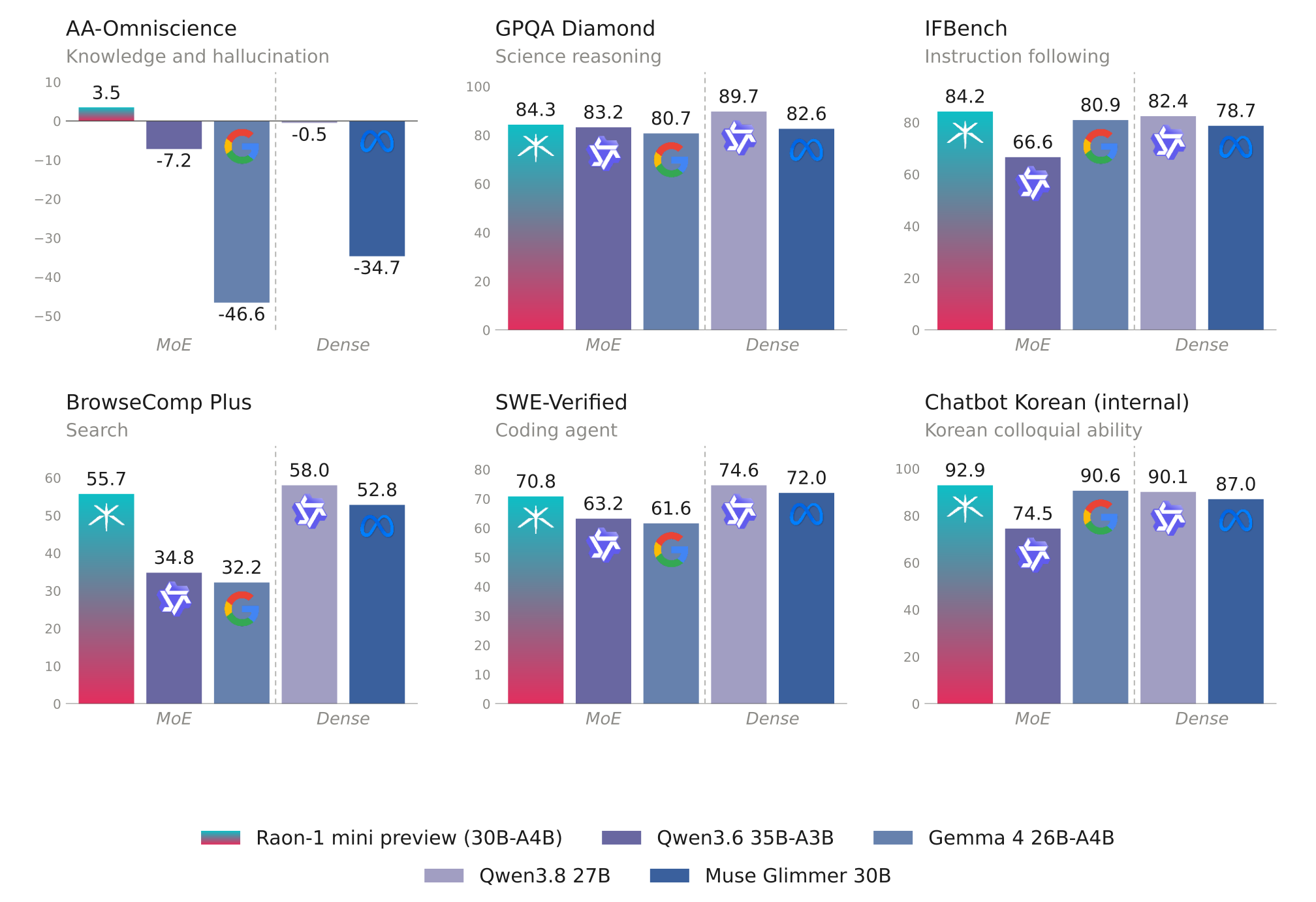
- Reasoning: Built-in thinking, with leading results on the math and science benchmarks shown below.
- Instruction following and search: Leads the comparison models on the instruction-following and search benchmarks shown below.
- Korean and English: Strong Korean language ability, and solid performance in English.
- Agent execution: Tool calling for agentic workflows, with support for Hermes Agent, Pi and OpenCode.
- Speculative decoding support: A DFlash2 draft model is provided for accelerated speculative decoding.
- Quantization options: Available in MXFP8 and NVFP4 formats, with NVFP4 enabling inference on a single NVIDIA RTX 5090 gpu (32 GB VRAM).
Model Overview
Raon-1 mini uses a hybrid Mixture-of-Experts (MoE) architecture, consisting of 18 linear attention layers and 7 full attention layers.
- Raon Delta Attention (RDA): Raon Delta Attention decouples the erase and write gates of Kimi Delta Attention, which improves long-context performance over KDA.
- Raon-mHC: Raon-mHC reduces the computational cost of DeepSeek’s manifold-constrained hyper-connections (mHC), which speeds up training.
- Hybrid layout: 18 of the 25 layers are Raon Delta Attention layers with a fixed-size state. Only the 7 MLA layers keep a KV cache, about 8 KiB per token in BF16.
- Long context: Natively supports up to 262,144 tokens of context.
- Sparse MoE: 6 of 128 routed experts plus 1 shared expert are active per token, so each token uses 4.3B of the 28.8B total parameters.
Benchmark Results
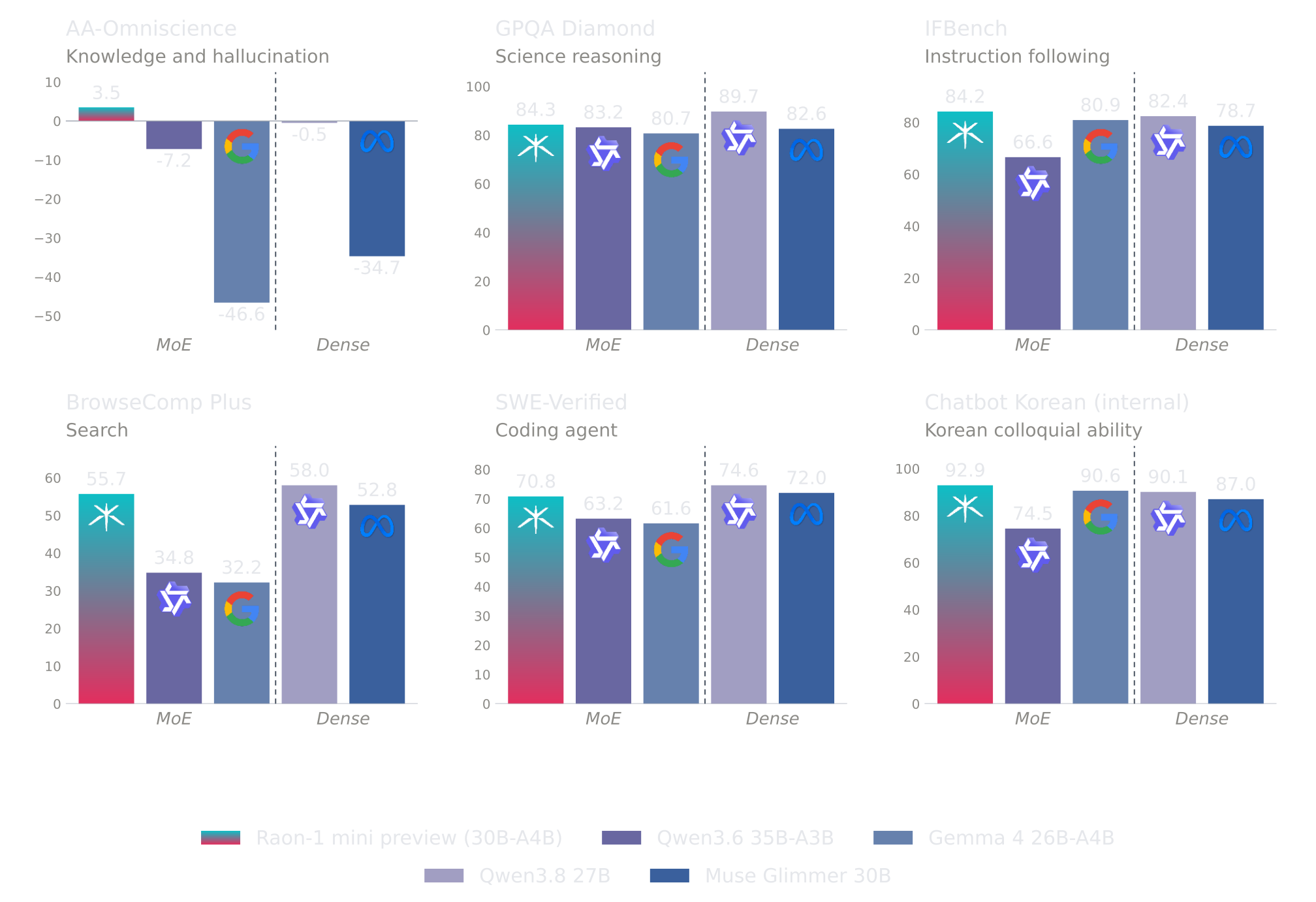
- Red indicates the best performance of Raon-1 mini preview among MoE baselines.
Judge and user simulator: gpt-5.6-luna for all evaluations.
Red = Raon-1 mini preview is best within the MoE group (Raon-1 mini preview, Qwen3.6-35B-A3B, Gemma 4 26B-A4B). Dense models (Qwen3.8-27B, Muse Glimmer 30B) are shown for reference only.
¹ SWE-Verified: evaluated with the mini-SWE-agent harness.
² GDPVal (dataset): metric is a judge score, not Elo.
³ AutomationBench: public split, not the official evaluation set.
⁴ GDP.pdf: official Artificial Analysis (artificialanalysis.ai) text-only version. PDFs are OCR-ed in advance; no image input.
⁵ Chatbot Korean (internal): an internal benchmark measuring Korean colloquial ability in chatbot conversations across diverse situations. Not publicly released.
Sampling parameters
[!Important]
Raon-1 mini is designed for thinking mode; disabling it is not recommended.
Settings shared by all tasks:
Settings that depend on the task:
Speculative Decoding
We release a DFlash2 draft model alongside Raon-1 mini preview to accelerate inference through speculative decoding. In our benchmarks on a single NVIDIA B300, it delivers up to 2.18× higher output throughput than autoregressive decoding. Speedups vary by hardware and workload.
Throughput is measured in output tok/s, with speedup over autoregressive decoding in parentheses. Acceptance length (AL) is the mean number of tokens per verification step, averaged across requests at concurrency 1.
AR: autoregressive decoding; C: concurrency.
Throughput is total output tokens divided by end-to-end wall time.
Evaluated with vLLM 0.28.0 and an MXFP8 target model; block size 8
(7 draft tokens), probabilistic draft sampling, temperature 1.0,
top-p 0.95, top-k 20, thinking enabled, up to 4,096 new tokens,
and 128 prompts per benchmark (80 for MT-Bench).
Quickstart
Raon-1 mini supports inference with Transformers, vLLM, llama.cpp,
and MLX. The examples below show how to run the model locally or
launch an OpenAI-compatible server, using thinking mode and the
recommended sampling settings above.
The model repositories are gated. Request access once on this page
(approval is automatic; it covers every Raon-1 mini preview
repository), then log in so the examples below can download them:
Transformers
Use Hugging Face Transformers to load Raon-1 mini and generate
responses directly in Python.
Install the dependencies:
Then run the model:
presence_penalty is applied by the model's remote code, since
Transformers has no built-in presence penalty.
For coding and math, set presence_penalty to 0.0.
On a 32 GB GPU, use the base MXFP8 model with device_map="auto"
and CPU offload.
vLLM (beta)
Use vLLM to serve Raon-1 mini through an OpenAI-compatible API
with tool calling and DFlash2 speculative decoding.
Tested on NVIDIA B300. The RTX 5090 NVFP4 profile is documented below.
Install from our fork and start the server:
The first start compiles the model's kernels and takes about 10 minutes;
later starts reuse them.
To serve the NVFP4 checkpoint, replace the model with
KRAFTON/Raon-1-mini-preview-nvfp4 in the same command.
It runs on a single GPU (tensor parallel size 1).
RTX 5090 (32 GB)
Use the NVFP4 checkpoint with the following settings.
CUDA Toolkit 13 with nvcc on PATH is required.
Send a request from another terminal:
Reasoning is returned in message.reasoning;
the answer is in message.content.
For coding and math, set presence_penalty to 0.
llama.cpp
Use llama.cpp to run the GGUF checkpoint locally in a terminal
or through an OpenAI-compatible API, with optional DFlash2
speculative decoding.
Checkpoint: KRAFTON/Raon-1-mini-preview-gguf
Build from our branch; upstream support is pending.
On Windows, see the build guide.
Start a terminal chat. The model downloads automatically.
Or start an OpenAI-compatible server:
For coding and math, use --presence-penalty 0.
For DFlash2 speculative decoding, append these options to either
command with a trailing \ on the preceding line.
The draft model downloads automatically.
Send a request from another terminal:
Reasoning is returned in message.reasoning_content;
the answer is in message.content.
For coding and math, set presence_penalty to 0.
MLX (Apple silicon)
Use MLX to run Raon-1 mini locally on Apple silicon,
either directly in Python or through an OpenAI-compatible API.
Checkpoint: KRAFTON/Raon-1-mini-preview-mlx
Install the dependencies with Python 3.11+:
Run in Python:
Or start an OpenAI-compatible server:
Send a request from another terminal:
Use http://localhost:8000/v1 as the base URL
and default_model as the model name.
For coding and math, set presence_penalty to 0.
Agentic Use
Raon-1 mini preview can be used with agent harnesses such as Hermes Agent, Pi, and OpenCode through an OpenAI-compatible API. The examples below assume an endpoint at http://localhost:8000/v1 with the model ID Raon-1-mini-preview. Adjust these settings to match your server, ensuring that tool calling and reasoning are properly supported.
[!NOTE]
With MLX, use KRAFTON/Raon-1-mini-preview-mlx as the model ID instead of Raon-1-mini-preview; mlx_lm server loads the model named in each request.
Hermes Agent
Register Raon-1 mini preview as a custom OpenAI-compatible model in ~/.hermes/config.yaml:
Hermes automatically detects the context window from the server when supported. If detection fails, add context_length: 262144 under model:. Replace dummy with your API key if the endpoint requires authentication.
Pi
Register Raon-1 mini preview as a custom provider in ~/.pi/agent/models.json:
Select the model using /model inside a session, or launch Pi with --model raon/Raon-1-mini-preview. Replace dummy with your API key if the endpoint requires authentication.
OpenCode
Register Raon-1 mini preview as a custom OpenAI-compatible provider in ~/.config/opencode/opencode.json (or opencode.json in your project root):
The model field sets Raon-1 mini preview as the default model. You can also select it interactively using /models. If the endpoint requires authentication, configure an API key under options or use OpenCode's authentication settings.
For all three agent harnesses, the configured context window and maximum output tokens should not exceed the limits supported by the serving backend.
Access
Raon-1 mini preview is an open-weight model. Access is granted on request.
You can also try it in the Raon-1 mini playground, free for a limited time.
License
Hugging Face model card / README notice License - Apache 2.0
The Raon model, including its model weights, configuration files, and other model components made available for download through this repository, is licensed under the Apache License, Version 2.0. Subject to that license, you may download, use, modify, and redistribute the model and its weights, including for commercial purposes.
Krafton and its licensors retain ownership of their respective intellectual property. The Apache License grants the rights stated in that license and does not transfer ownership. Rights in third-party materials remain subject to their applicable terms.
The Apache License does not extend to Krafton’s proprietary training datasets, training methodologies, undistributed software, hosted API, playground, or other proprietary materials not included in this repository.
Hosted API and Playground Have Separate License Terms
Krafton also makes Raon available through its hosted API and playground service (“RAON Service”). The Raon Service is not licensed under Apache 2.0. Access to and use of the Raon Service is governed by separate Hosted Access Terms and Conditions that are provided before access to the service is granted. The Hosted Access Terms and Conditions govern, among other things, permitted service use, suspension, termination, and Krafton’s right to charge fees in the future.